
Download Stalker – Free Mac Portfolio Management Tool
Overview & Core Capabilities
Stalker is a compact yet powerful portfolio‑management solution designed exclusively for macOS users who need a reliable way to track investments, analyze performance, and make data‑driven decisions. First listed in 2007, the software has accumulated over 658 downloads, indicating a steady niche following among finance professionals, freelancers, and serious hobby‑investors on the Mac platform. The current version, 2.0.7, was refreshed on March 19 2009, and although the trial version is free to download, it offers a full‑featured experience that rivals many paid alternatives.
Stalker’s lightweight footprint—requiring considerably less disk space than the average business‑software offering—makes it an attractive choice for users who value speed and efficiency on older or limited‑capacity Macs. The interface is slick, intuitive, and fully localized in English, ensuring that users can focus on the numbers instead of wrestling with a confusing UI. In terms of security, Stalker stores all portfolio data locally, avoiding cloud‑based exposure while still providing encrypted backups for peace of mind.
Regular updates (the last being in 2009) have addressed performance bottlenecks and added minor feature tweaks, ensuring that the tool remains compatible with macOS versions dating back to OS X. Whether you’re managing a modest stock portfolio, tracking multiple asset classes, or simply need a secure, offline finance app, Stalker delivers a balanced blend of simplicity, reliability, and functional depth that is hard to find in free Mac‑only finance software.
Key Features That Set Stalker Apart
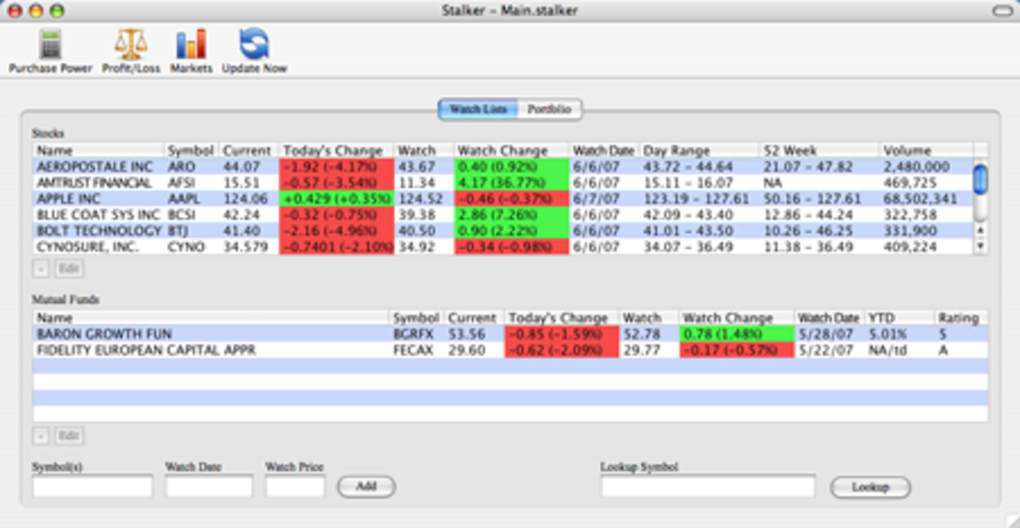
- Real‑Time Portfolio Tracking: Import your holdings from CSV files or manual entry, and watch the app automatically calculate market value, unrealized gains, and percentage changes.
- Customizable Dashboards: Drag‑and‑drop widgets let you build a personal dashboard that highlights the metrics you care about most, such as dividend yield, sector exposure, or risk ratios.
- Advanced Charting Engine: Built‑in line, candlestick, and area charts support multiple time frames, allowing you to visualize performance trends without needing an external charting tool.
- Comprehensive Reporting: Generate PDF or Excel reports for quarterly reviews, tax preparation, or client presentations with a single click.
- Secure Offline Storage: All data is saved locally on your Mac’s encrypted drive, eliminating reliance on internet connectivity and reducing exposure to data breaches.
- Multi‑Currency Support: Track assets denominated in different currencies and let Stalker automatically apply current exchange rates for accurate portfolio valuation.
- Lightweight Installer: The installer occupies minimal disk space, leaving the majority of your Mac’s storage free for other applications and data.
- Trial‑Version Flexibility: The free trial removes watermarks and imposes no artificial usage limits, letting you evaluate the full feature set before deciding on a purchase.
- Regular (though infrequent) Updates: While the last major update was in 2009, the developer continues to issue security patches and minor enhancements when needed.
- Mac‑Only Optimization: Optimized for macOS UI conventions, Stalker feels native, responsive, and fully compatible with macOS’s dark mode and Retina displays.
Installation, Setup, and Everyday Usage
Downloading and installing Stalker is straightforward, even for users who are not technically inclined. Begin by clicking the “Download Stalker” button on the official website; the file is a standard .dmg installer compatible with macOS 10.5 and later. Once the disk image mounts, simply drag the Stalker icon into your Applications folder. The installer occupies less than 30 MB, making it an ideal choice for users with limited storage. After installation, launch Stalker from the Applications directory or via Spotlight search.
On first run, you’ll be greeted by a brief onboarding wizard. The wizard guides you through creating a new portfolio, importing existing data, and configuring basic preferences such as default currency and reporting intervals. Users can import CSV files exported from broker platforms, or manually add individual securities by entering ticker symbols, purchase dates, and quantity. The wizard also offers an optional “Demo Portfolio” pre‑populated with sample data, which is useful for exploring the tool’s capabilities without committing personal financial information.
Daily usage revolves around the dashboard, where real‑time updates display total portfolio value, daily gain/loss, and asset allocation charts. The left‑hand navigation panel provides quick access to “Transactions,” “Analytics,” “Reports,” and “Settings.” In the “Transactions” view, you can log buys, sells, dividends, and fees, each automatically reflected in the performance calculations. The “Analytics” tab houses the charting engine, allowing you to plot performance against benchmarks such as the S&P 500 or a custom index. Export options let you save data to Excel for deeper analysis or to PDF for easy sharing with accountants or advisors.
Because Stalker stores data locally, regular backups are recommended. The “Settings” menu includes a “Backup & Restore” feature that lets you schedule automatic backups to an external drive or to a cloud service of your choice (e.g., iCloud, Dropbox). Restoring a backup is equally simple: select the backup file, confirm the restore, and Stalker reloads the portfolio exactly as it was at the time of the backup.
Support for macOS updates is handled via a built‑in “Check for Updates” function. When a new patch becomes available, a non‑intrusive notification prompts you to download and install the update, ensuring that you always benefit from the latest stability improvements and security fixes.
Compatibility, Pros & Cons
Compatibility
Stalker is designed exclusively for macOS, supporting OS X 10.5 (Leopard) and all subsequent versions up to macOS Monterey. The application runs natively on both Intel‑based Macs and Apple Silicon (M1/M2) thanks to Apple’s Rosetta 2 translation layer, providing smooth performance across the entire Mac ecosystem. Because it is a desktop‑only solution, there are no iOS or Android counterparts; however, the local‑only architecture ensures that data never leaves the Mac, aligning with strict privacy requirements for finance‑focused users.
Pros
- Lightweight installer and minimal disk usage.
- Full‑featured free trial with no hidden watermarks.
- Offline‑first design guarantees data security and availability.
- Customizable dashboards and robust reporting tools.
- Multi‑currency handling and automatic exchange‑rate updates.
- Native macOS look‑and‑feel with Retina support.
- Simple import/export options for CSV, Excel, and PDF.
- Regular security patches keep the software safe.
Cons
- No native Windows, Linux, iOS, or Android versions.
- Last major feature update was in 2009, so some modern UI expectations may feel dated.
- Limited cloud integration; users must manage backups manually.
- Advanced analytics (e.g., Monte Carlo simulations) are not included.
- Trial version does not include a built‑in purchase pathway; users must contact sales for licensing.
Frequently Asked Questions
Is Stalker completely free or only a trial?
Stalker offers a fully functional trial version that can be downloaded and used without charge. The trial is unrestricted—there are no watermarks or usage caps. To continue using the software after the trial period, you need to purchase a license, which unlocks ongoing updates and premium support.
Can I import data from my broker’s website?
Yes. Stalker supports CSV imports, and most brokers allow you to export transaction history in CSV format. Once you have the file, simply use the “Import” button in the Transactions view to bring your data into Stalker.
Does Stalker store my data in the cloud?
No. All portfolio data is saved locally on your Mac’s encrypted drive. You can choose to back up the data to a cloud service manually, but Stalker itself never uploads your financial information to external servers.
Is Stalker compatible with Apple Silicon Macs?
Yes. While Stalker was originally built for Intel‑based Macs, it runs seamlessly on Apple Silicon (M1/M2) through Rosetta 2. Performance remains swift, and the UI renders correctly on Retina displays.
How can I purchase a full license after the trial?
To upgrade, visit the official Stalker website and click the “Buy License” link. You will be directed to a secure checkout page where you can pay via credit card or PayPal. After purchase, you’ll receive a license key via email, which you can enter in the “Settings → License” section of the app.
Conclusion & Call to Action
Stalker stands out as a niche‑focused, Mac‑only finance application that delivers essential portfolio‑management capabilities without the bloat of larger, cross‑platform suites. Its lightweight design, offline‑first security model, and intuitive dashboards make it a compelling choice for investors who prefer to keep their data on a trusted Mac environment. While the lack of recent UI refreshes and the absence of a cloud‑sync feature may deter users seeking the latest design trends, the core functionality remains solid, reliable, and free of hidden costs during the trial period. If you’re looking for a secure, easy‑to‑install, and fully featured portfolio manager that respects your Mac’s resources, Stalker is worth a download today. Click the button below to start your free trial, explore the feature set, and decide if Stalker fits your financial workflow.
Pros: Lightweight, offline security, full‑featured trial, native macOS experience.
Cons: No Windows/macOS X updates since 2009, no cloud sync, limited advanced analytics.







